Dictation for the Mac that handles English, 普通話 and 廣東話 — including switching between them mid-sentence. Everything runs on your own machine. No account, no cloud, no subscription. Mac 上嘅語音輸入,聽得明英文、普通話同廣東話, 一句入面轉嚟轉去都得。全部喺你部機度行,唔使開戶口,唔上雲端,唔使月費。
One recording, run through Apple's built-in dictation, Wispr Flow and Cantalkie. They fail in opposite directions — which is the whole point. 同一段錄音,分別入咗 Apple 內建聽寫、Wispr Flow 同 Cantalkie。 三個嘅失敗方向唔同 —— 呢點先係重點。
client became Thien, tight became Tetra, tag became take. No sentence punctuation at all. client 變咗 Thien、tight 變咗 Tetra、tag 變咗 take。成段冇句號。
Every English term correct. But 佢話 came back as 他說, 得唔得 as 行不行, 過嚟 as 過來 — Mandarin, not what was said. 英文全部啱。但「佢話」變咗「他說」、「得唔得」變咗「行不行」、 「過嚟」變咗「過來」—— 我冇咁講過。
Ten of eleven English terms, Cantonese intact, punctuation in place. We got one wrong too — 「我 send」 came out as “I sent”. It is in the video. 十一個英文詞啱咗十個,廣東話原汁原味,標點齊全。 我哋自己都錯咗一個 —— 「我 send」變咗「I sent」,條片入面照擺出嚟。
呢啲唔係感覺 —— 6,933 句嘅完整量度喺呢度 →Not an impression — the full measurement over 6,933 utterances →
No window steals your focus. A glow runs along the edge of the screen — green while it listens, cyan while it transcribes — so you never have to look away from what you were writing. 冇窗口搶你個焦點。螢幕邊會有一圈光 — 聽緊你講嘢係綠色,轉緊文字係青色 — 你唔使望開去。
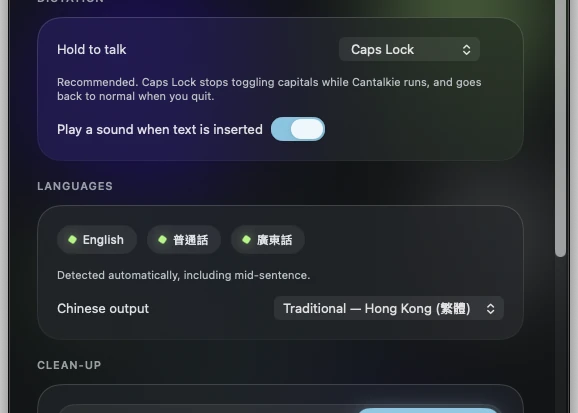
Caps Lock becomes push-to-talk. Nothing is recorded until you press it, and the text lands where your cursor already was. Caps Lock 變咗按住講。你唔撳佢唔會錄, 啲字會插入你個游標本身嗰度。
caps lockMost dictation tools treat Cantonese as an afterthought, and it shows. Cantalkie was built around it from the start. 大部分語音輸入工具都當廣東話係附送嘅,用起上嚟就知。 Cantalkie 由第一日開始就係圍住廣東話嚟做。
Spoken Cantonese, transcribed as Cantonese — not quietly rewritten into formal written Chinese. Output is Traditional Chinese, as Hong Kong writes it. 你點講就點出,唔會靜雞雞幫你改成書面語。出嚟係繁體字,跟香港習慣。
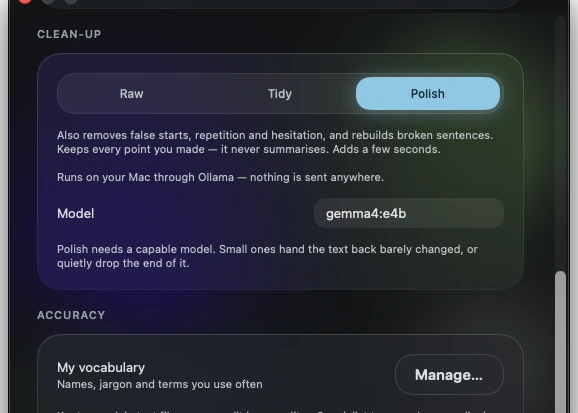
The speech model runs locally. Your voice is never uploaded, never stored on a server, and the app works with the network switched off entirely. 語音模型喺本機行。你把聲唔會上傳,唔會存喺人哋部伺服器,熄咗網一樣用得。
Hold Caps Lock, say what you mean, let go. The text lands in whatever app you were already typing in — mail, chat, notes, a browser field. 撳住 Caps Lock 講嘢,放手,啲字就入咗你本身用緊嗰個 app — 電郵、傾偈、筆記、瀏覽器都得。
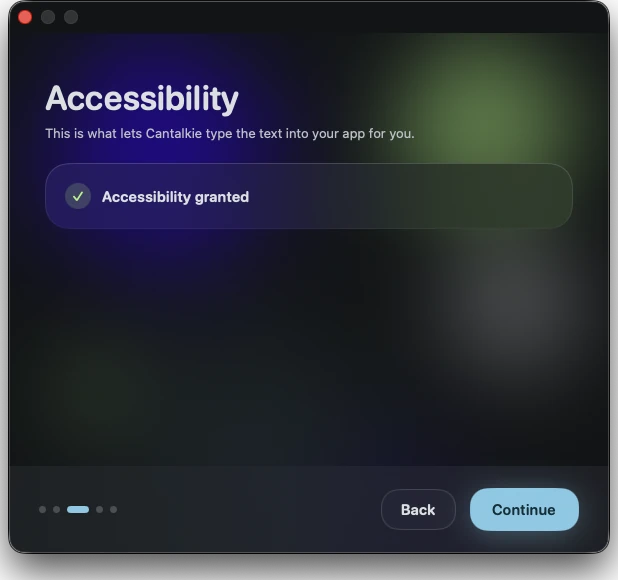
A guided setup walks through the two permissions macOS needs, then gets out of the way. Everything else lives in one small Settings window. 設定精靈會帶你行完 macOS 要嘅兩個權限,之後就唔阻你。 其他嘢全部喺一個細細嘅設定視窗入面。
Try everything for 14 days. If you keep it, you pay once. 全功能試用 14 日。想繼續用,一次過俾錢就得。
Shown in your own currency at checkout — about US$45 or HK$388. 結帳時會用返你當地貨幣顯示,大約 US$45 或 HK$388。
Changed your mind? Email us within 14 days of buying and we refund you, no questions asked. Payments are handled by Polar, our reseller and merchant of record — we never see your card. 買咗又後悔?14 日內電郵我哋,即刻退款,唔會問長問短。 付款由 Polar 處理,佢哋係我哋嘅授權經銷商,你張卡嘅資料我哋見唔到。
Cantalkie is made by Ajuby International Limited, a software company registered in England and Wales. We build on-device speech tools for languages that the big providers handle badly. If you would like to talk to us about the product, licensing it, or working together, write to [email protected] and a human will reply. Cantalkie 由 Ajuby International Limited 開發, 一間喺英格蘭及威爾斯註冊嘅軟件公司。我哋專做本機語音工具,針對大廠做得唔好嘅語言。 想傾產品、授權,或者合作,歡迎電郵 [email protected],會有真人回覆。
同一個想法嘅三個做法:你講嘅嘢同你影嘅相, 應該留喺你自己部機。全部離線行,唔使開戶口。 Three takes on one idea: what you say and what you photograph should stay on your own machine. All three run offline, and none of them needs an account.
Cantalkie對廣機 · dictation
一撳 Caps Lock 就講,講咩打咩。廣東話、普通話、英文,一句入面轉都得。Hold Caps Lock and talk. Cantonese, Mandarin and English, including mid-sentence.
Mac Cantalkie Meetings會議紀錄 · minutes
錄低個會議,寫低邊個講過乜,再整成一份 Word 會議紀錄。Records the meeting, writes down who said what, and turns it into a Word document.
Mac Blur Photo遮蓋人臉 · redact
掃過人臉、車牌或者文字,即刻模糊、打格或者用表情符號蓋住。Brush over a face, a plate or some text and it is blurred, pixelated or covered.
iPhone · iPad